
Home › Modules › Access control and audit log
INFRASTRUCTUREWho changed what, and when.
Role-based access with a separate permission for financial data. Every action is recorded permanently with the user, the timestamp and a summary.
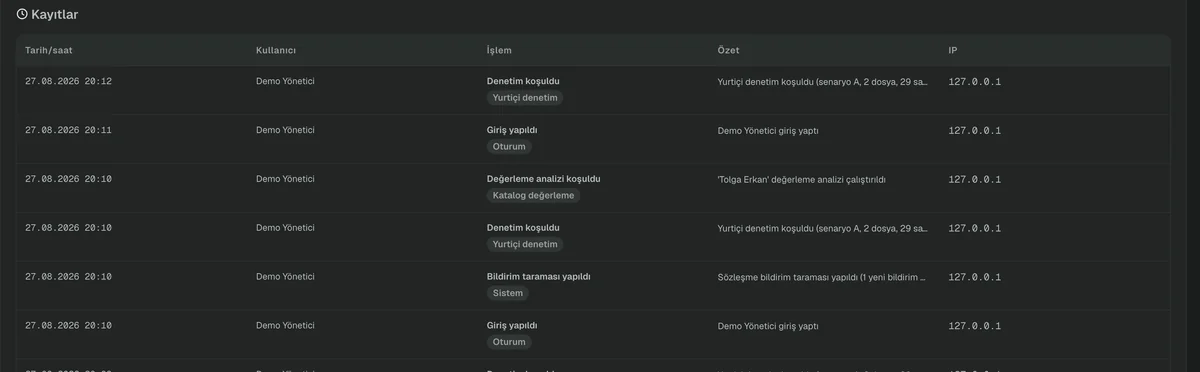
From a demo environment prepared with sample data. Click to enlarge.
The problem it solves
Royalty data is sensitive. Not everyone in a publishing company needs to see every figure, and the person who uploads a file need not be the person who can change a contract rate.
Limiting access is not enough on its own either. When a rights holder asks about a past period, you have to be able to show when a rate was changed and by whom. The answer has to live in the record, not in someone’s memory.
How it works
Assign the roles
There are three roles, and each sees a different set of screens. Adding users and changing roles is an administrator action.
Grant financial access separately
For screens that show amounts, the role alone is not sufficient; financial access is defined on top of it.
Read the trail
Login, file upload, audit run, contract change, period addition, claim opening, matching decision — every successful action is recorded.
Filter and review
Records can be filtered by user, module, action type and date range, and the summary text is searchable.
Input and output
WHAT YOU PROVIDE
- User and role definitions
- Financial access permissions
WHAT YOU GET
- Role-based screen access
- A permanent audit log
- Filtered record list by user, module and date
What it does not do
Knowing the limits of a tool matters as much as knowing its capabilities.
- The audit log records successful actions only.
- The module list visible in the menu is a visibility setting; the actual protection is the role and the financial access permission.
- There is no row-level data restriction per user — a user who can see a screen sees every record on it.
See access control and audit log on a live system.
In a half-hour call we can run it on your own catalogue.